

 نویسنده: بسیجی گمنام خمینی
  جمعه دوازدهم آبان ۱۳۹۱ - 20:37
Available now from the on-line shop page |
New for Autumn 2012
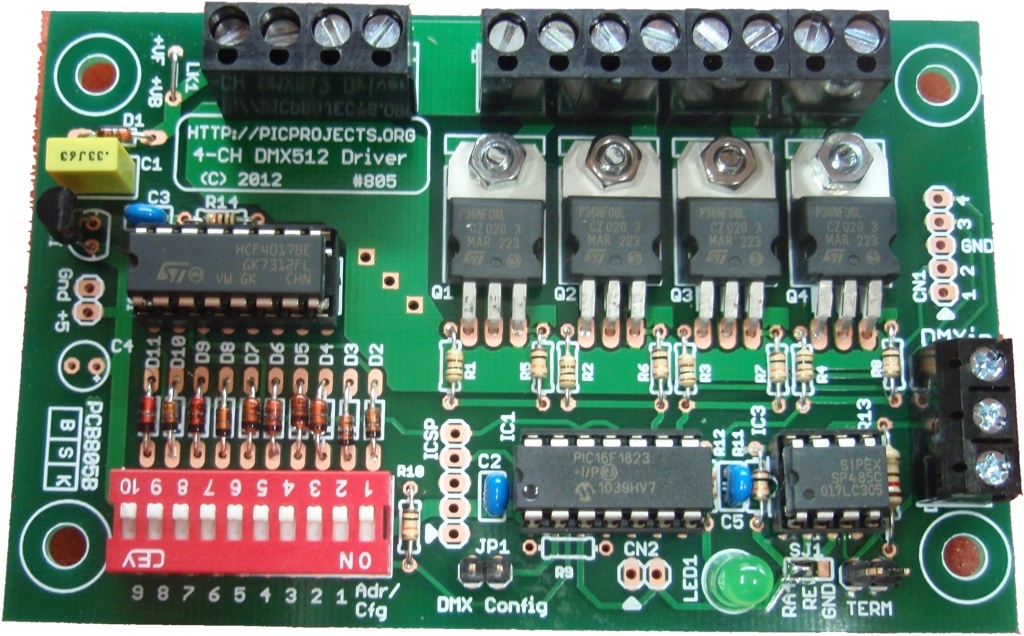
4-channel DMX512 PWM LED Driver Board
 |
|
Description
This project is a 4 channel DMX512 driver board. It features four power MOSFETs that can be configured to operate in PWM mode or as on/off outputs. The driver can be configured to use any four consecutive addresses across the full 512 channel address range. It can drive LED arrays or low voltage lamps with either an 8 bit (256 step) PWM dimming signal or digital on/off mode under DMX control.
Feature list:
- 4 channels with low side, open-drain 'N'-channel MOSFETs providing up to 3 amps per channel
- Channel output current switching from 1mA to 3 amps
- Channel voltage range from 3 to 36 volts
Outputs can drive LED modules, strips, lights or low voltage lamps up to 35 watts.
- Two output modes:
- 8 bit resolution PWM mode with a PWM period of 5ms (200Hz).
- digital on/off output.
- Operating mode is individually configurable for each output
- Operate as four independent outputs or Ganged operation where all four outputs are controlled from the base address DMX data channel
- When no DMX data is received the driver can be configured to turn off all outputs, or leave them in their current state.
- Configuration held in EEPROM so once configured can operate with no external switches or jumpers.
In keeping with the original 4-channel DMX driver project #800, the firmware supports a minimal external hardware design.
Although the new PCB805B has a configuration DIP switch on the board, the DMX base address and configuration modes are stored in the microcontrollers internal non-volatile EEPROM. Once settings have been made the firmware uses the saved settings from the EEPROM if no DIP switch is detected.
Additionally the original configuration via in-band DMX channel data is still supported. Fitting a single jumper puts the firmware into 'in-band' configuration mode. DMX data sent in the first four channels is saved to the EEPROM allowing the DMX base address and configuration word to be setup without the use of the external DIP switch.
The project page for the previous version of the 4-Channel DMX driver can be found here:
Previous 4-Channel DMX driverThe following options for the DMX512 PWM Driver are available to buy from the Picprojects eShop
- Complete kit of parts, including PCB and pre-programmed PIC microcontroller, order code #805K
- PCB805 only, order code #805P
- PIC microcontroller pre-programmed with DMX firmware, order code #PRG805

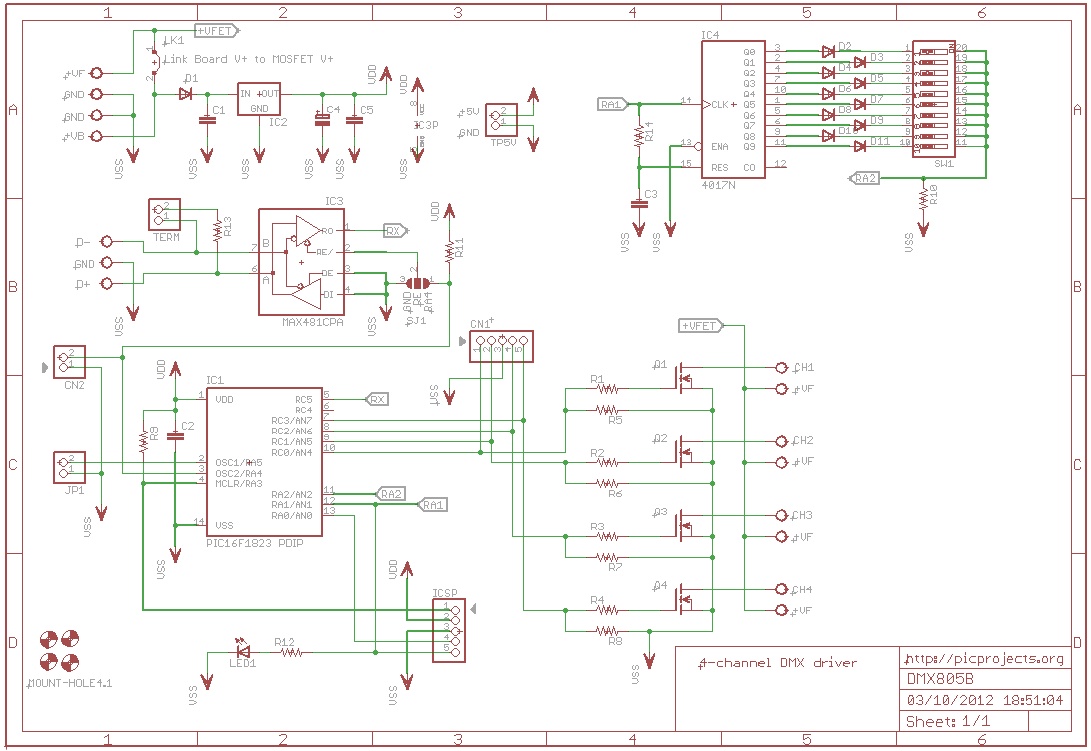
Schematic
| |
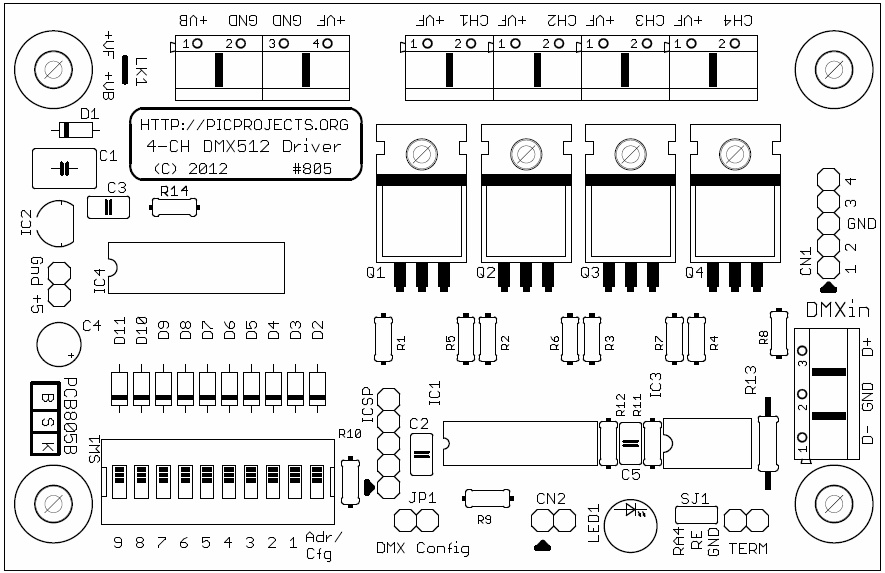
PCB Component Overlay
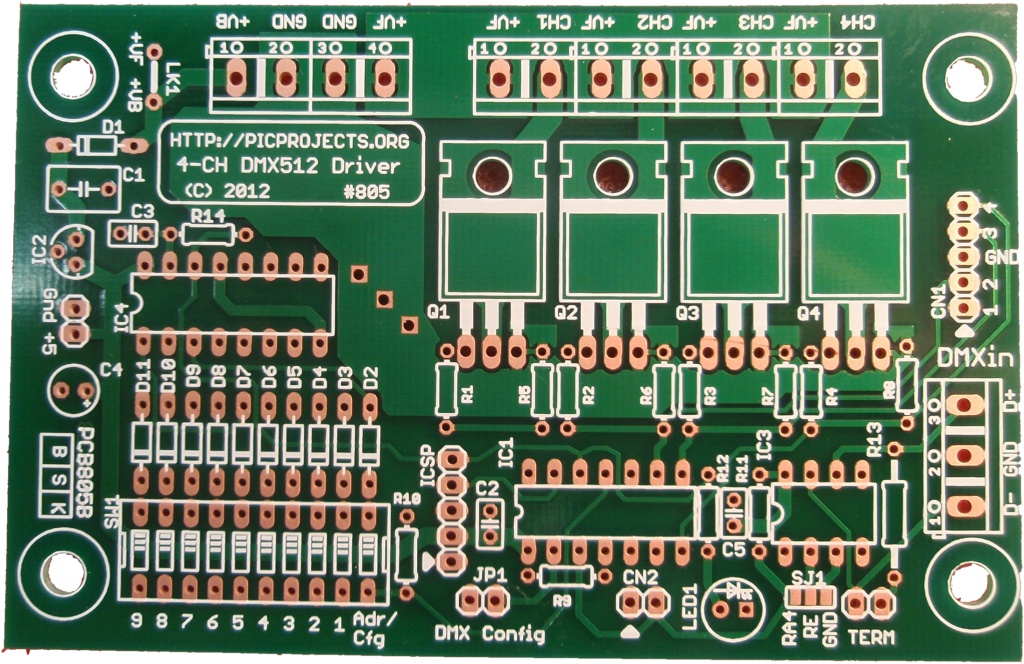
| Production PCB
|
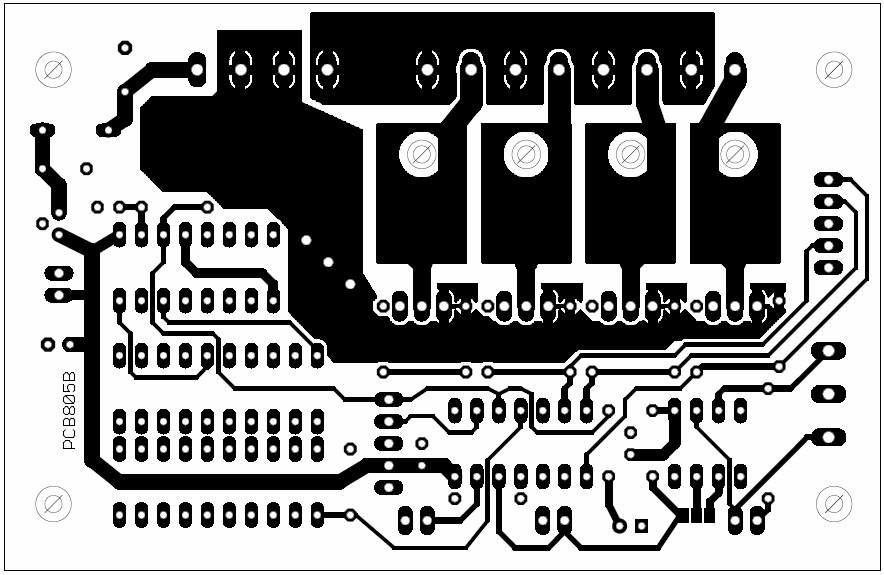
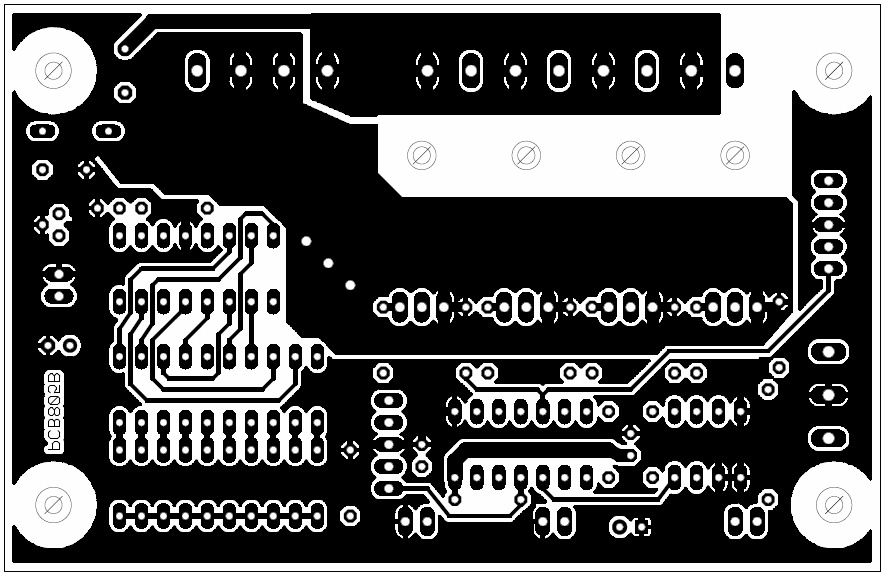
PCB Layout
| Bottom |
The above PCB is available from the Picprojects on-line store
| |
Component List
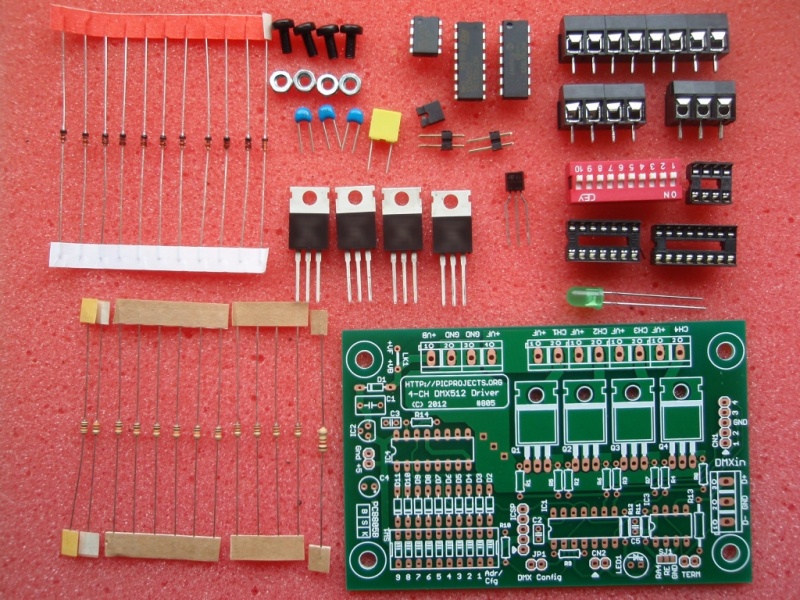
Buy a complete kit of parts from the PICPROJECTS online eShop. Kit contains all the components required to assemble the complete 4-Channel DMX512 Driver project, including the PCB and microcontroller pre-programmed with the DMX805 firmware.
Order code 805K
Component Description R1,R2,R3,R4 120R 0.125 watt R5,R6,R7,R8,R10,R11 10K 0.125 watt R12 330R 0.125 watt R13 120R ( 0.25w or 0.5 watt) R14 1K0 0.125 watt R9 not used All resistors are 5% carbon film.
Where 0.125 (1/8) watt parts are specified these are required to fit on the PCB due to size constraints.C1 330nF polyester (5mm pitch) C2,C3,C5 100nF multilayer ceramic (2.5mm pitch) C4 not used D1-D11 1N4148 diode IC1 PIC16F1823-I/P (Must be programmed with DMX firmware) IC2 78L05 voltage regulator IC3 MAX481 (or equivalent RS485 transceiver) IC4 HCF4017B Q1,Q2,Q3,Q4 STP36NF06L logic level N-MOSFET (STP20NF06L alternate part) LED1 5mm LED green SW1 10-way DIP switch CN1 5-pin 0.1" header (not used) ICSP 5-pin 0.1" header (not used) CN2 2-pin 0.1" header (not used) JP1 2-pin 0.1" header TERM 2-pin 0.1" header 2,54mm jumper links for shorting JP1 / TERM header DMXin 3-way, 5mm, screw-terminal Power-in terminal block 4-way, 5mm, screw-terminal, 16 amp (2 x 2-way end stackable) Channel output terminal block 8-way, 5mm, screw-terminal, 16 amp (4 x 2-way end stackable) IC1 socket 14-pin DIP socket IC3 socket 8-pin DIP socket IC4 socket 16-pin DIP socket Miscellaneous item x 4 M3 nut + M3 x 6mm machine screw (to mount MOSFET to PCB) Notes:
- Apart from resistor R13 all other resistors are 0.125 (1/8) watt parts. These a specified for physical space constraint reasons on the PCB.
- The output driver MOSFETs Q1-Q4 are STP36NF06L or STP20NF06L. These are logic level devices designed to operate with a low gate drive voltage. If an alternative non-logic level part is substituted you may need to derate the maximum output current per channel
- Alternative pin-compatible parts exist for the RS-485 transceiver, IC3.
- SP485 (EXAR)
- ST485 (ST)
- MAX483 (Maxim)
- MAX485 (Maxim)
- other parts are also available
- The PIC16F1823-I/P (IC1) requires programming with the DMX firmware. This part is only available from Picprojects as a pre-programmed and code protected part. (the firmware is not available to download)
See Pre-Programmed PICs section of the on-line eShop
Construction notes:
- Please read through this section at least once before starting assembly of the PCB
- Assembly is straightforward. You will need previous experience soldering electronic components, a suitable soldering iron, hand tools and a multi-meter.
- All photographs in the section link to a hi-res 1024x768 image for more detail.
- Refer to the schematic diagram and component listing above for component values used in this project
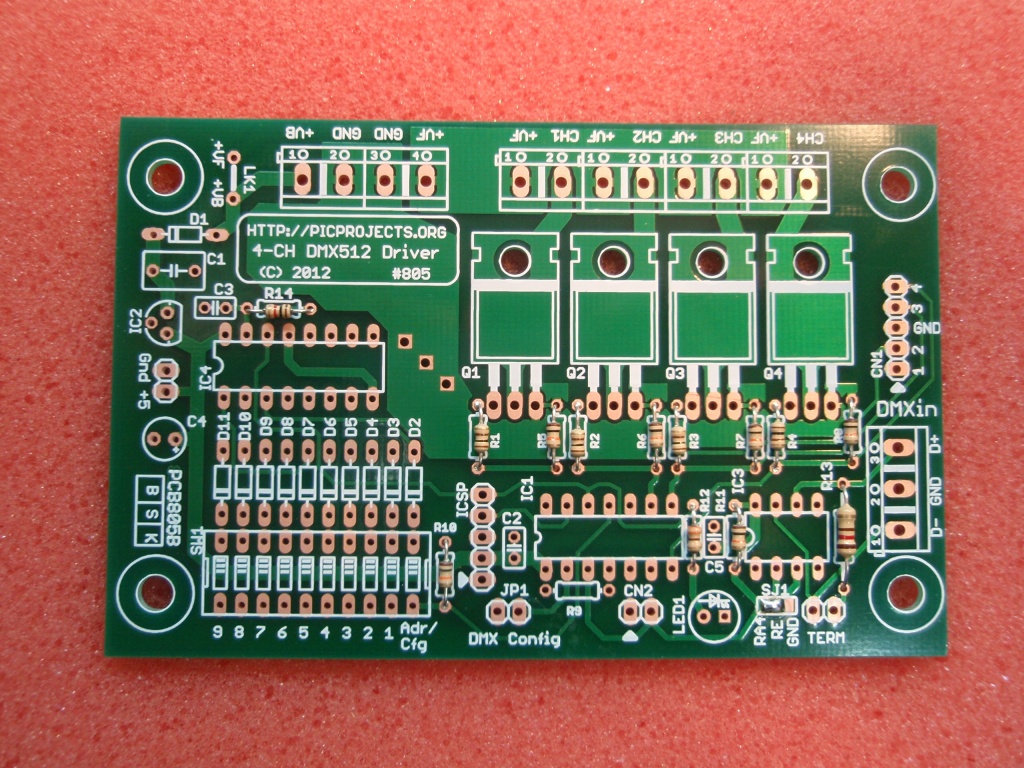
Fig.1
Fig .2
Fig. 3Fig 1. Make sure you assemble the board in an anti-static work area and follow ESD handling precautions, particularly when installing the four MOSFET devices (Q1,2,3,4)
- The MOSFETs are packed in a separate anti-static bag - don't remove them until needed.
- IC's 1,3 & 4 are shipped on black anti-static foam - don't remove them until needed.
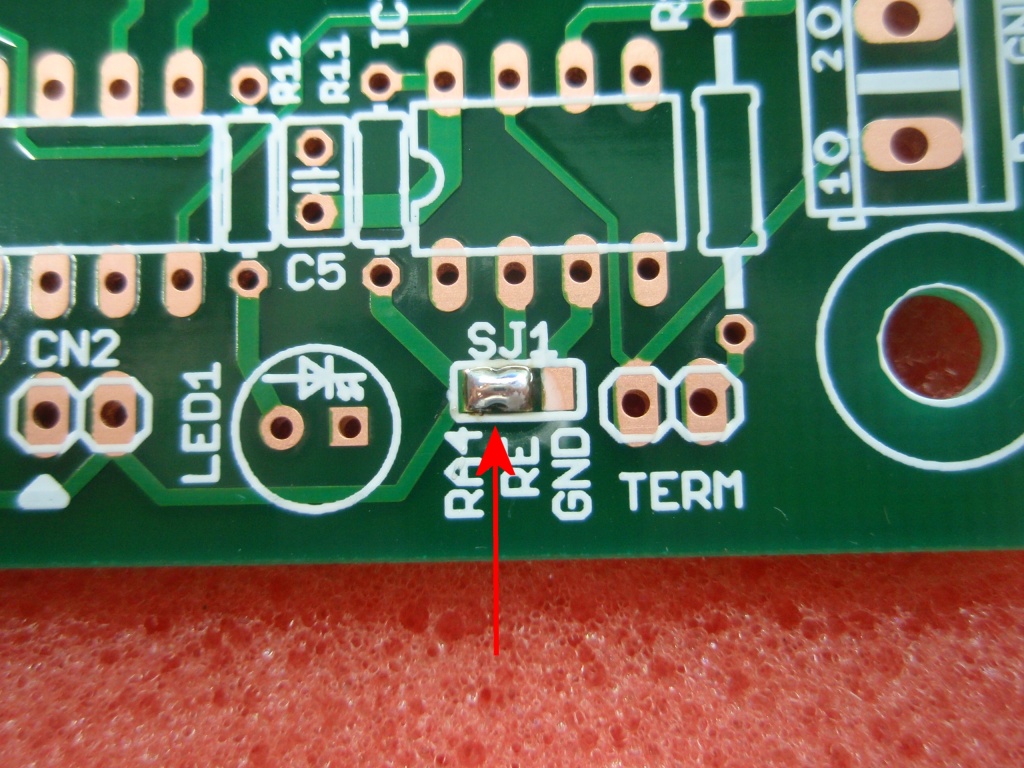
Fig 2. Start by placing a blob of solder across the RA4-RE pads of SJ1 solder jumper as shown.
Do not allow solder between the RE and GND pads.
Fig 3. Solder all the resistors in place. It doesn't matter which way round they go, the colour bands only indicate the resistance value. It is important that the correct value resistors are placed in the correct locations.
The 0.125 watt resistor are quite small and the coloured bands are not easy to read. Be sure to identify them correctly (if in doubt use a Multimeter on the resistance range setting to check the value)
120R [brown - red - brown - gold ] R1,R2,R3,R4,
330R [orange - orange - brown - gold ] R12
1K0 [brown - black -red - gold ] R14
10K [brown - black -orange - gold ] R5,R6,R7,R8,R10,R11
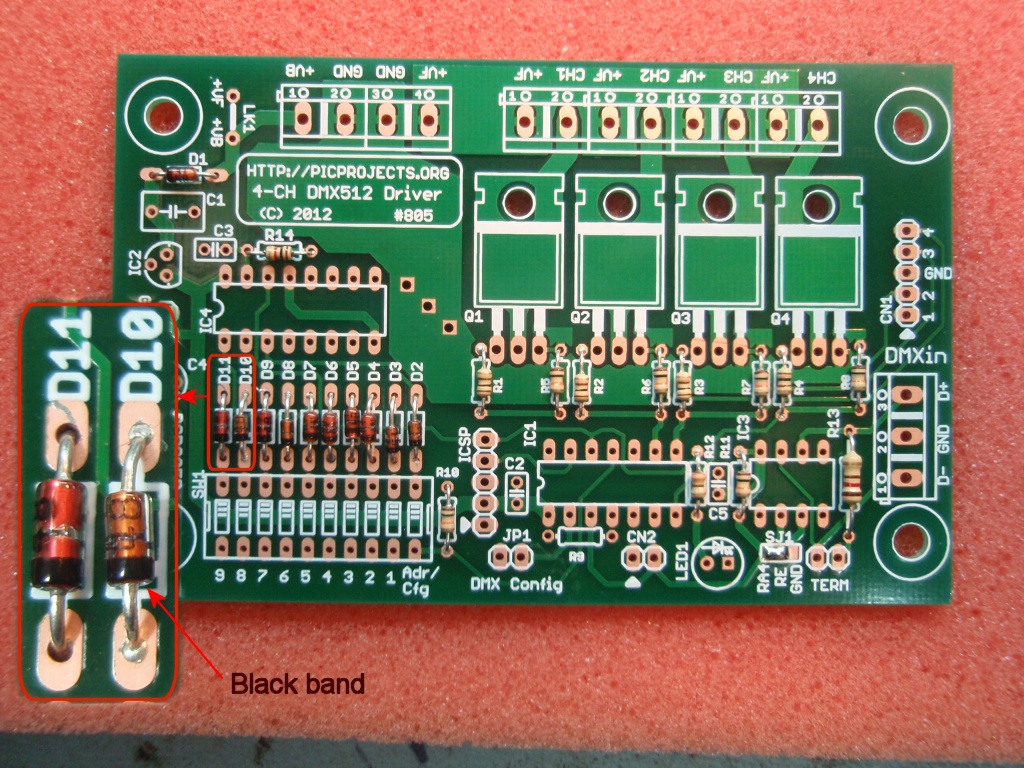
Fig.4
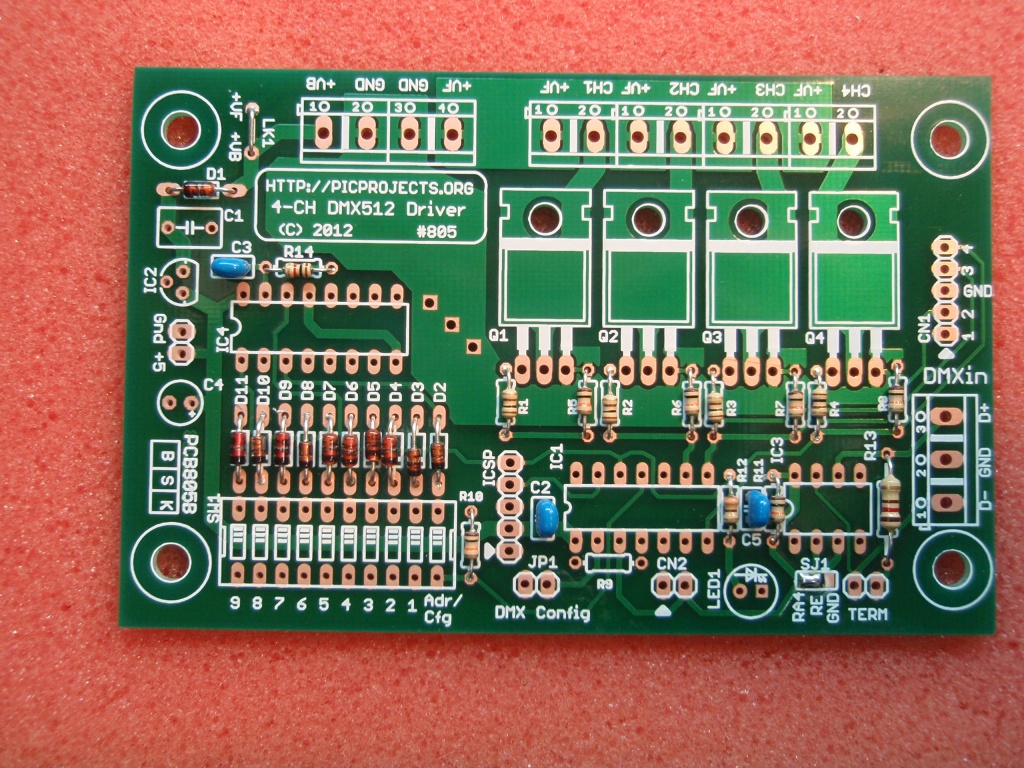
Fig.5
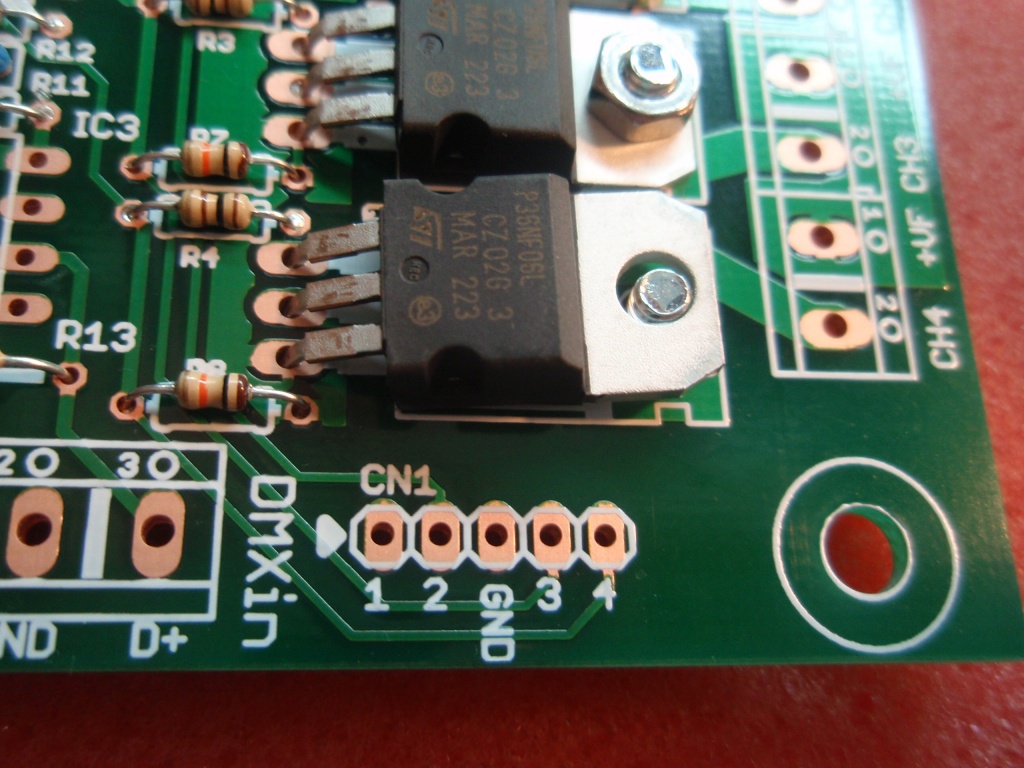
Fig.6Fig 4. Fit the diodes D1 to D11. These are all the same 1N4148 type.
Fig 5. Install the three 100nF capacitors to positions C2,C3 and C5. These are marked '104' on the body.
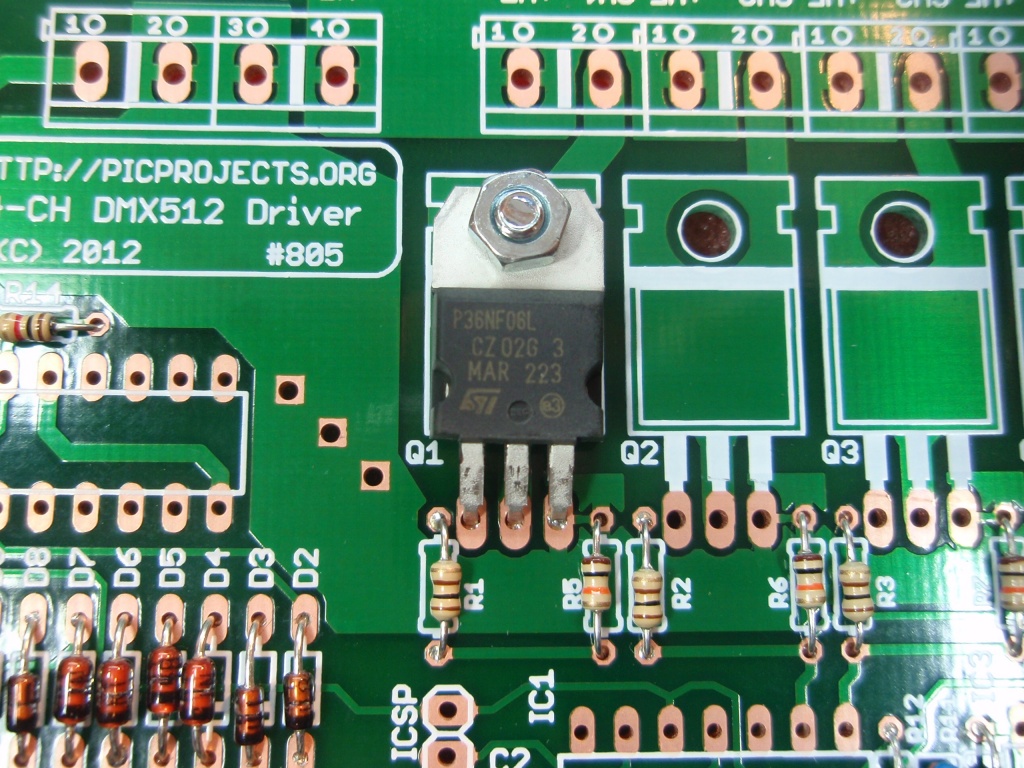
Fig 6. Install the four MOSFETs Q1,Q2,Q3,Q4
MOSFETs are static sensitive devices. Avoid touching the pins and handle by the main body only.
Install the MOSFETs one at a time.
- Place the pins through the PCB and then push down on the body of the MOSFET to bend it flat against the PCB.
- Use M3 x 6mm screw and M3 nut to fix the MOSFET to the PCB as shown.
- When the MOSFET has been mechanically secured to the PCB, solder all three pins of the MOSFET to the PCB
Repeat steps 1 to 3 for each MOSFET.
Fig.7
Fig.8
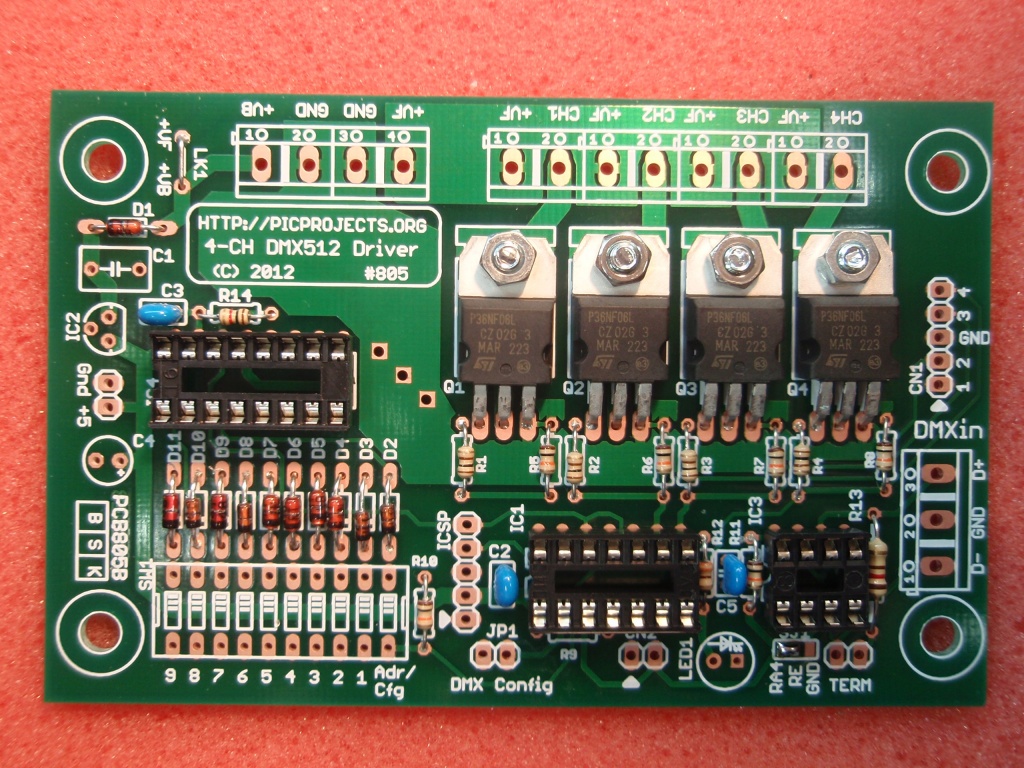
Fig.9Fig 7. & 8. Showing installation of the MOSFETs. Fig 9. Fit the three IC sockets to the PCB. Make sure all the pins go through the holes in the PCB and check that none of the pins have bent under the socket before soldering.
Each socket has an 'D' shaped indent at one end. This should align with the marking on the component screen print overlay.
Fig.10
Fig.11
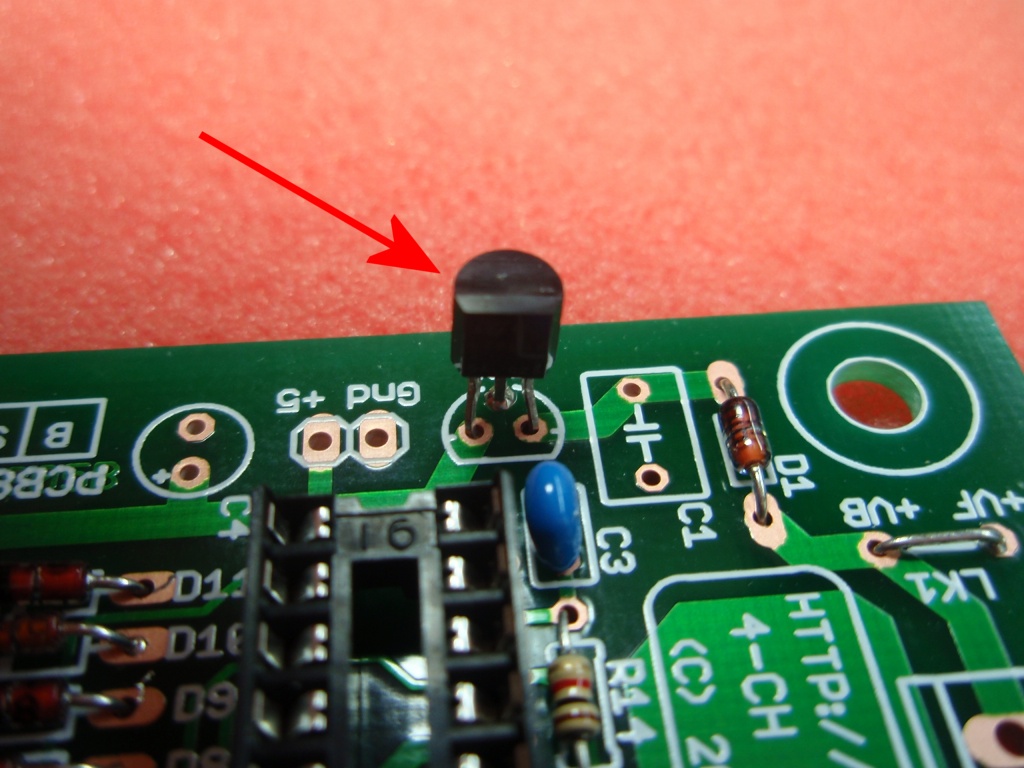
Fig.12Fig 10. Fit the 78L05 voltage regulator to the PCB. The pins may need realigning to fit the holes in the PCB. Take care to position it so the flat part of the body is aligned with the flat shown on the component screen print overlay.
Fig 11. Fit the 330nF capacitor C1. This is marked .33J63
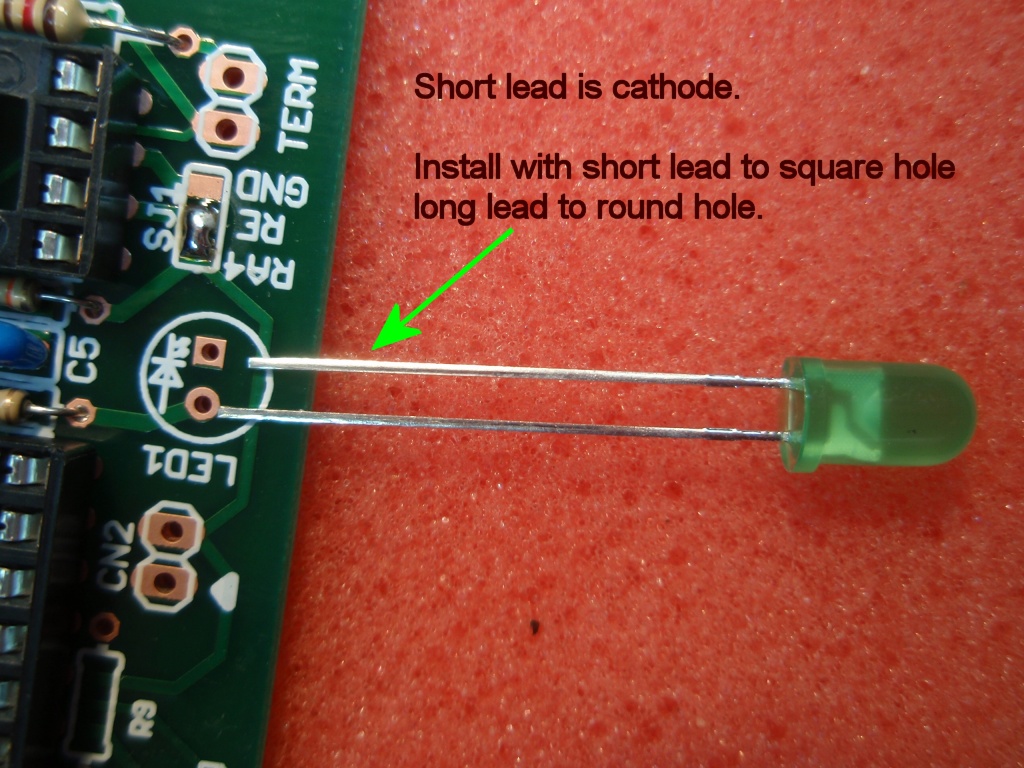
Fig 12. Fit LED1. One lead is shorter than the other. This marks the cathode terminal of the LED. Make sure to install with the short lead in the position shown in the photo.
Fig.13
Fig.14
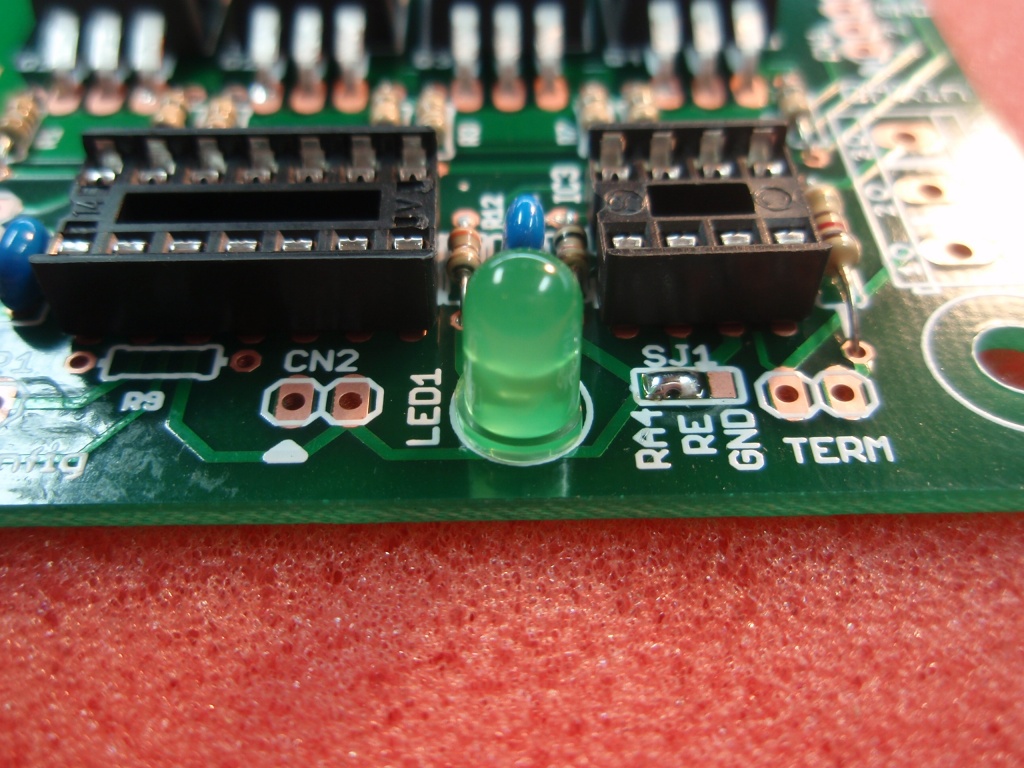
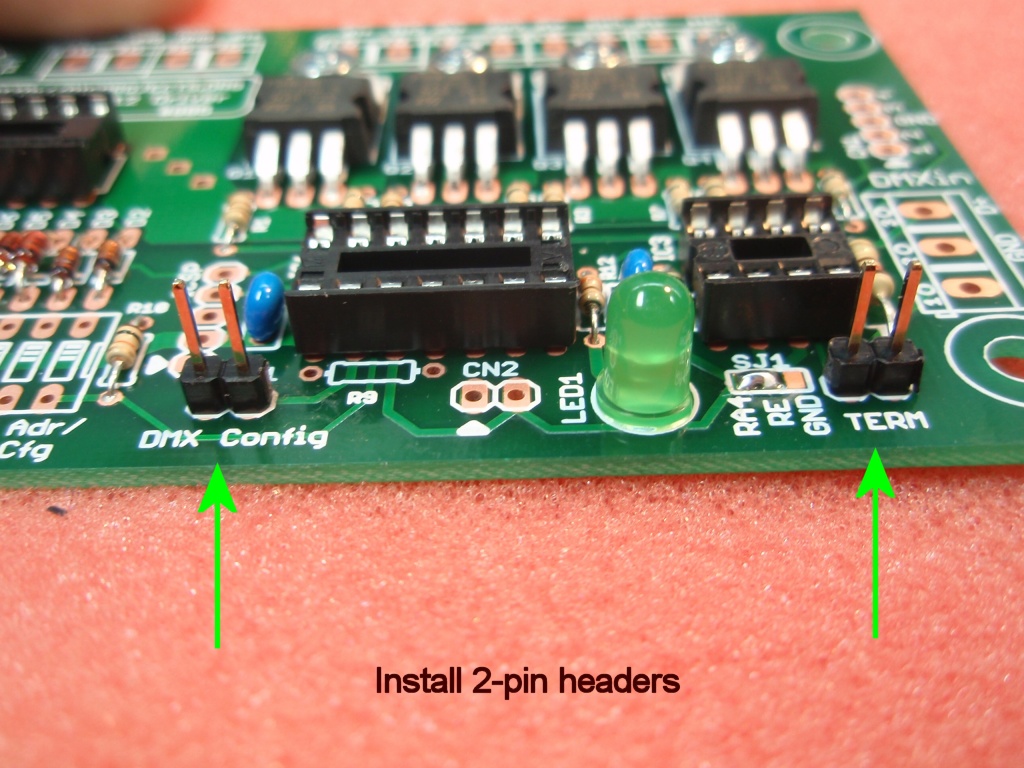
Fig.15Fig 13. Showing LED1 installed on the PCB. Fig 14. Solder the 2-pin header plugs to positions JP1(DMX config) and TERM as shown in the photo.
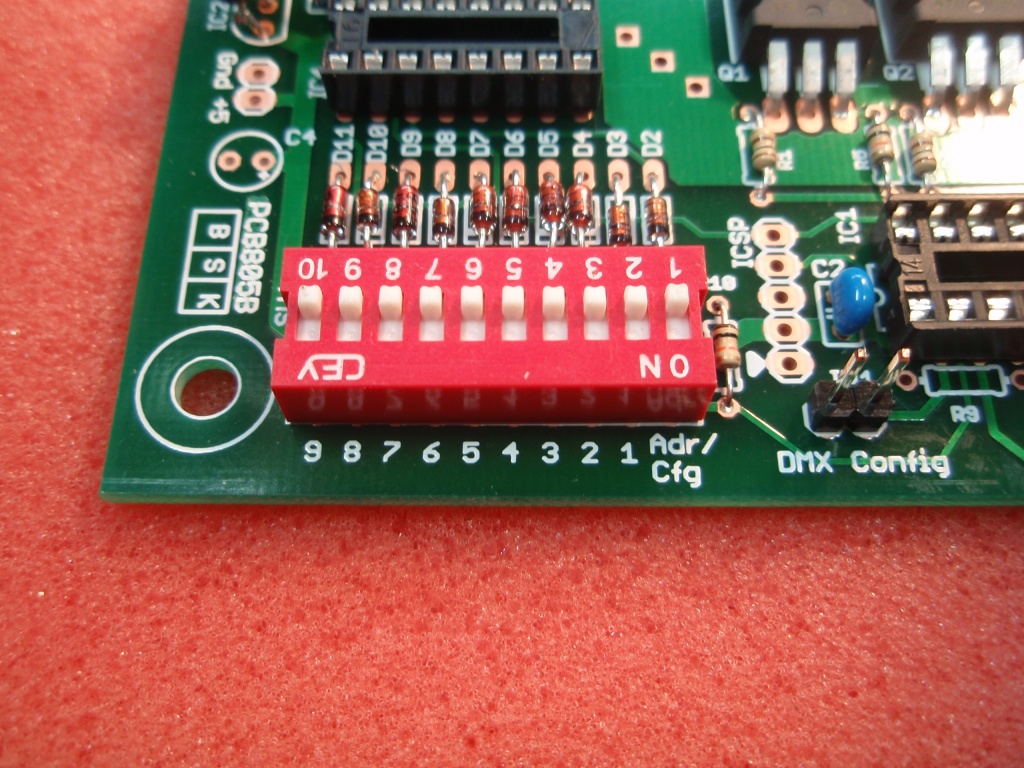
Fig 15. Solder the 10-way DIP switch to the PCB. Make sure to fit it so the switch 'ON' position is nearest the edge of the PCB as shown in the photo. This will make it easier to follow the configuration examples in the documentation.
Fig.16
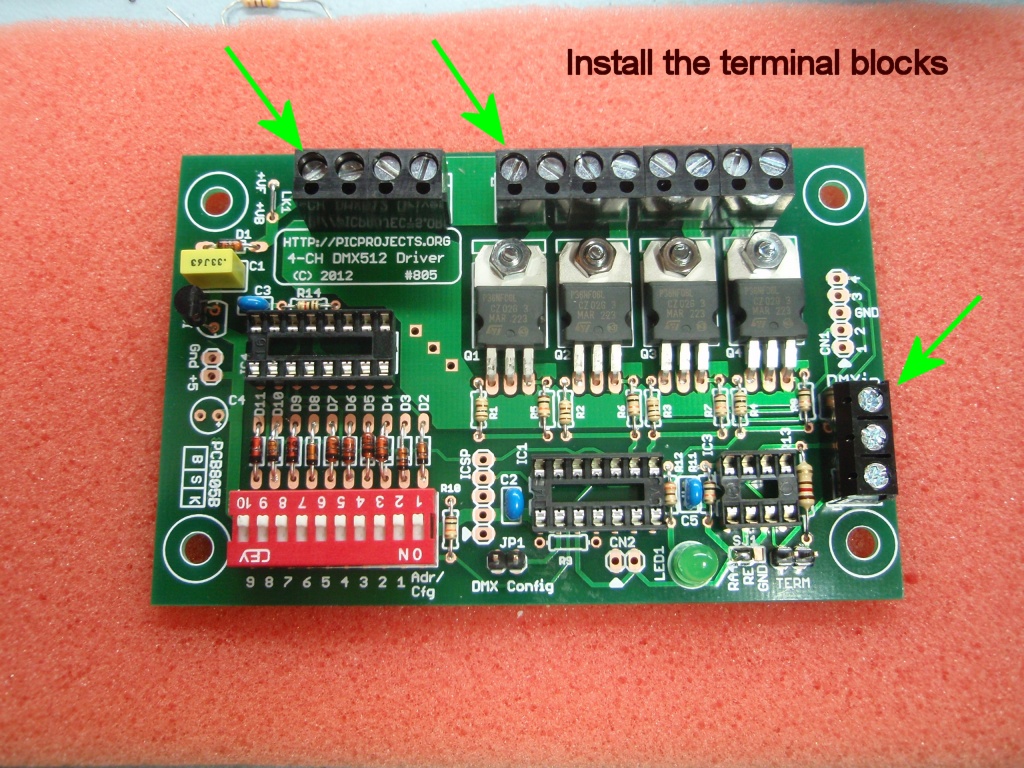
Fig.17Fig 16. Fit the 5mm screw terminal blocks to the PCB. The DMXin connector uses a 3-way terminal block.
The other two connectors use end-stackable 2-way connectors to make up the 4-way and 8-way blocks. If the supplied connectors are not already stacked together you should do this before fitting to the PCB.
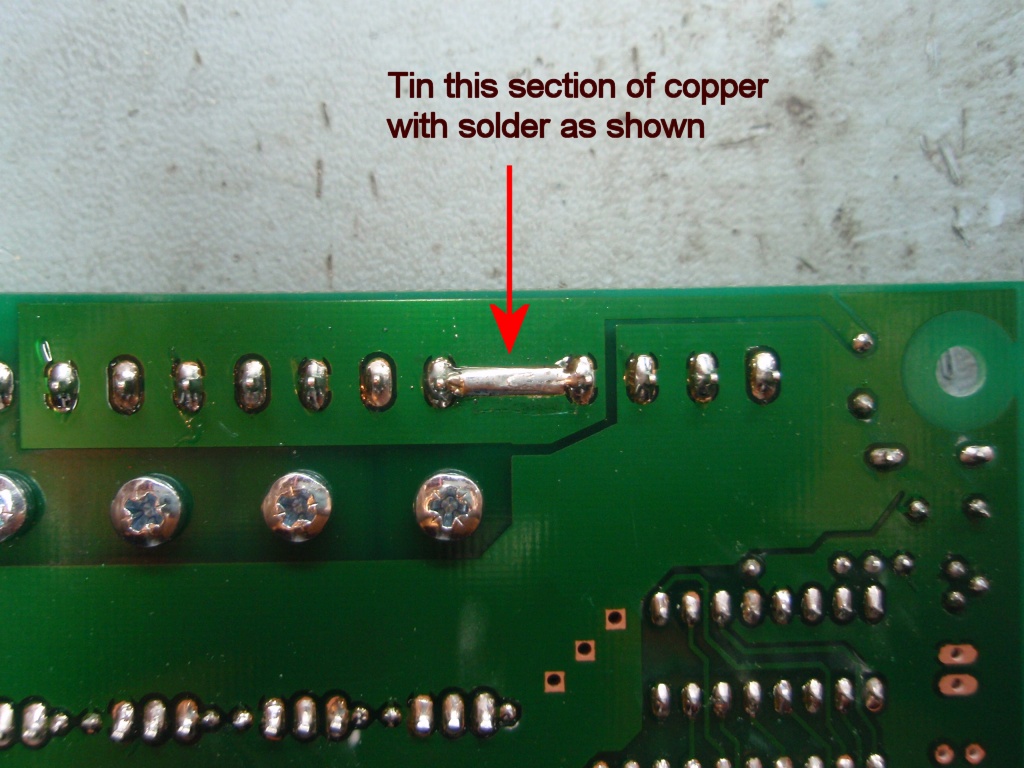
Fig 17. On the reverse side of the PCB there is a short length of exposed copper between the terminal blocks. Tin this section with solder to increase the electrical current carrying capacity of the PCB track.
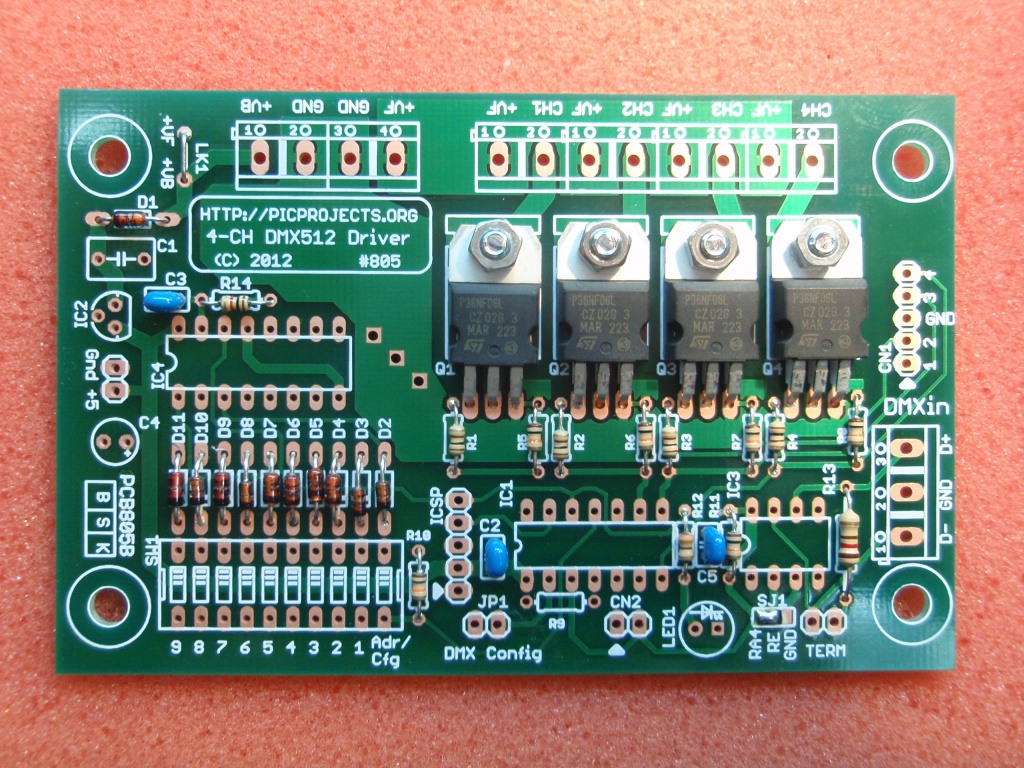
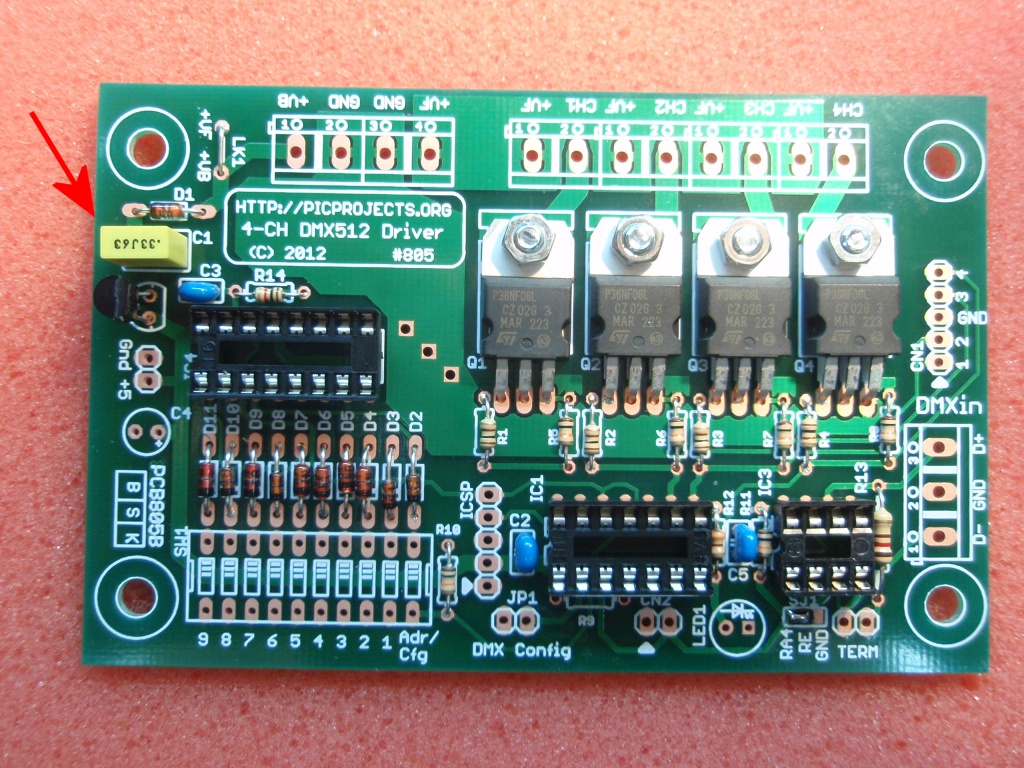
At this stage the assembly of the board is complete. Give the board a good visual check to make sure all the solder joints are good, there are no solder splashes or bridges on any of the joints. Check components are in the correct location and orientation where applicable.
Fig.18
Fig.19
Fig.20Fig 18. Before fitting the three IC's into the sockets check the 5 volt power supply to the board.
Connect a suitable DC power supply to +VB and GND connections of the power connector terminal block. The power supply output voltage should be in the range of 9 to 18 volts.
Measure the voltage at the 5 volt test point on the PCB as shown in the photo.
The voltage measured here must be between 4.8 volts and 5.2 volts. If it is not within this range investigate and correct the fault before proceeding.
Once the 5 volt power supply has been checked and is working correctly disconnect the power before proceeding.
Fig 19. Make sure the board is not connected to the power supply!
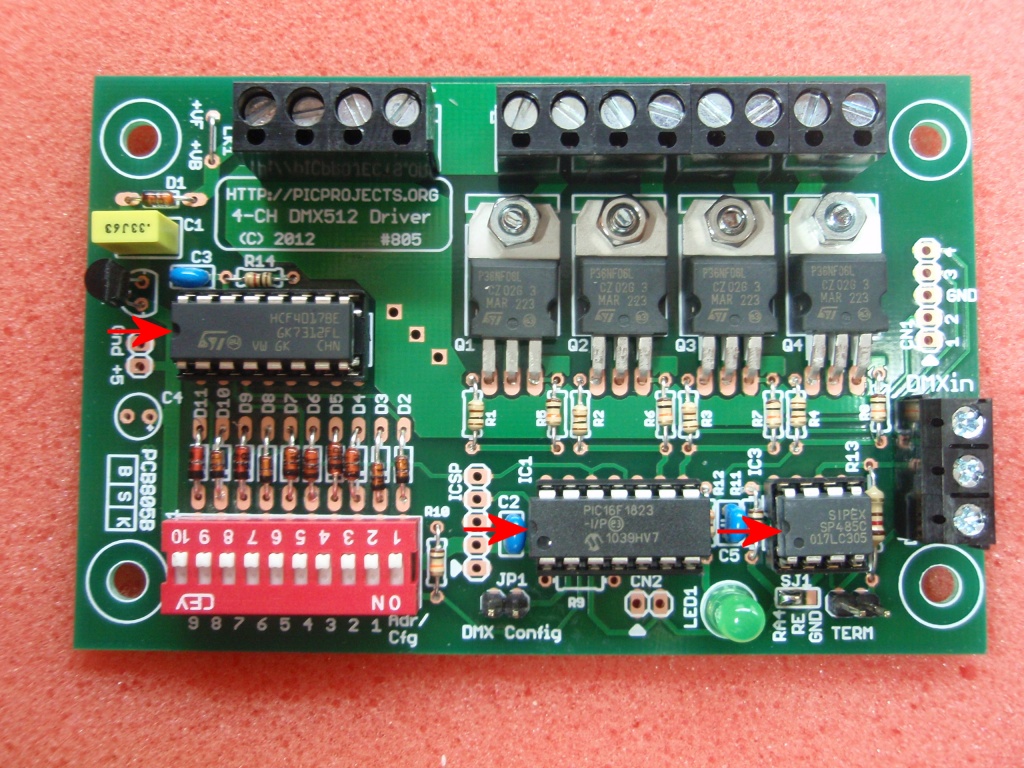
Install the three ICs into the sockets on the board
- IC1 is a 14-pin part marked PIC16F1823
- IC3 is a 8-pin part marked SP485 (alternative part may be supplied in the kit)
- IC4 is a 16-pin part marked HCF4017BE
Fit each IC into the correct socket. Since each IC has a different number of pins there is only one socket that matches each device.
Make sure that each IC is installed with the 'D' shaped indent in the body matching the indent in the socket. See photo Fig 19.
The control electronics on the board require a power supply input in the range 9 volts to 18 volts DC. This is made at the +VB and GND terminals of the 4-way terminal block.
Since the Channel Outputs can operate between 3 and 36 volts the board may require separate power sources for the board and channel power ( +VB and +VF)
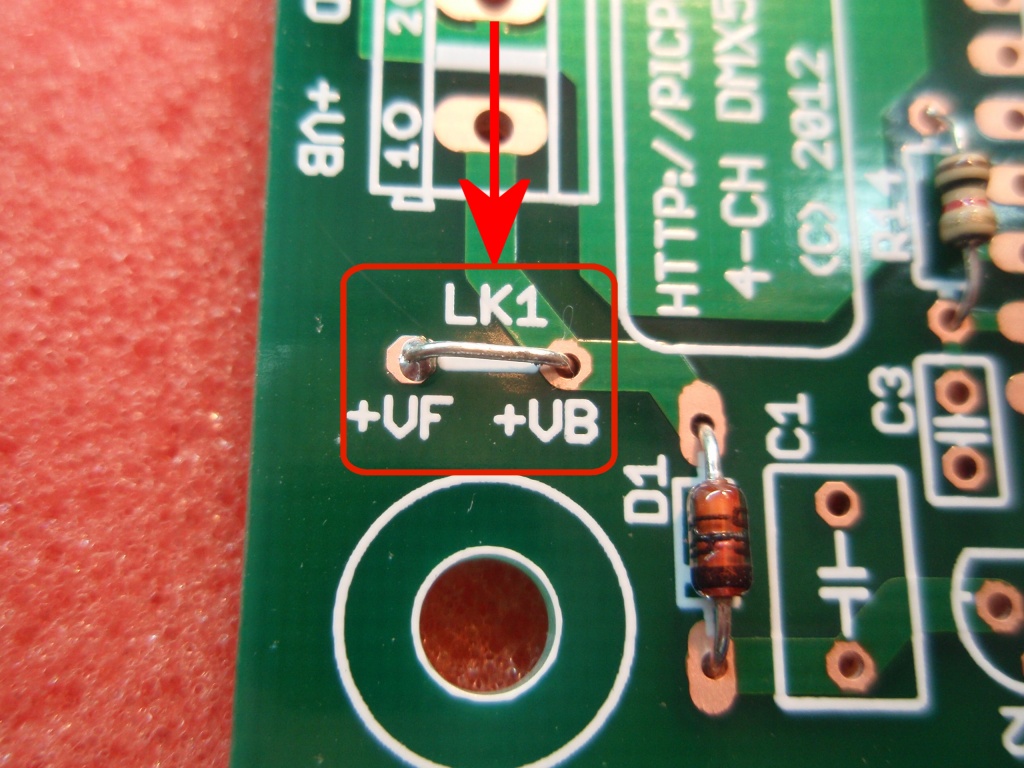
If the Channel Outputs are operating within the 9 volts to 18 volts range fitting the link wire to position LK1 will connect the +VF power input to the +VB board supply, eliminating the need for two power sources or extra wiring at the connector terminal.


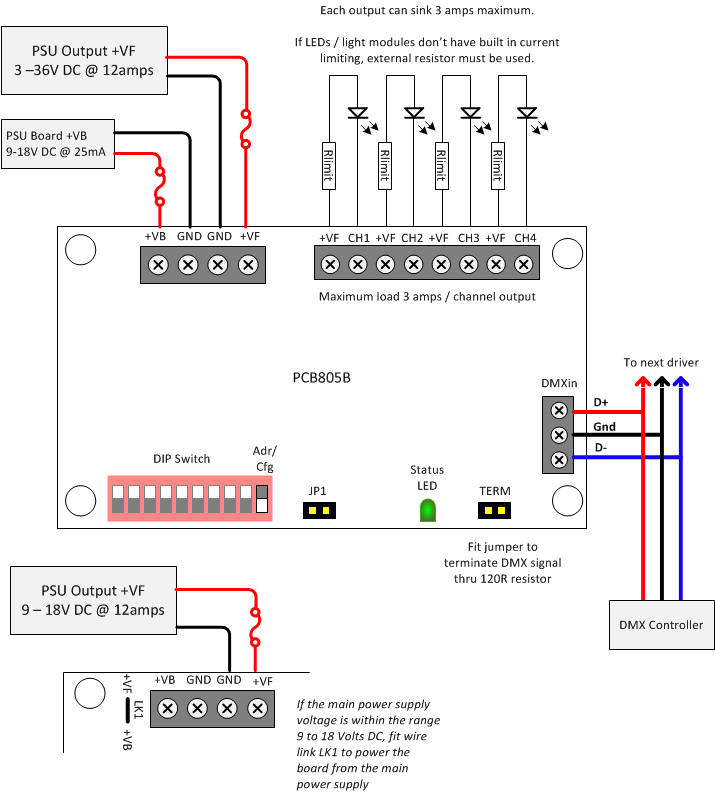
Connecting the board
This is a general overview of the connections to the 4 Channel DMX512 Driver PCB805B.
When connecting LED or LED modules to the controller consult the datasheet for the specific devices being used to ensure voltage and current limits are met.
Do not operate the board at currents or voltages outside the ranges shown here.
Ensure appropriate rated fuses are used in the power supply connections
Ensure correct wire gauge is used for the current it will be carrying.
The +VF connections shown are all connected to the same common PCB trace
The GND connections shown are all connected to a common Ground PCB trace+VF and +VB are the MOSFET and Board control electronics power inputs respectively. They are not electrically connected unless the link wire LK1 us fitted on the PCB. When fitted LK1 allows the board to derive its power from the +VF power input. This should only be fitted when the +VF input voltage is between 9 and 18 volts DC.
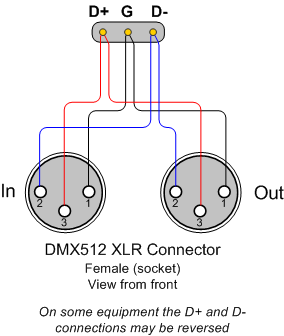
3-pin XLR Wiring for DMX512
Connection for DMX in-out using 3 pin XLR socket.
There are also standards for 5-pin XLR and RJ45 connection.
www.dmx512.com
Configuring Driver Options
Options Summary
The DMX driver board has various user configurable options as summarised below.
- Output drive mode
The outputs can be configured to operate in PWM mode or digital mode. Each channel can be individually configured to operate in either PWM or digital mode.
In PWM mode the channel output is driven with an 8 bit resolution PWM signal at 200Hz. The duty cycle is derived from the DMX channel data with 0 = 0% through to 255 = 100%
In digital mode the channel output is either on or off. The DMX channel data controls the output
- Channel data value 0 - output turns OFF
- Channel data values 1-254 - no change at output.
- Channel data value 255 - output turns ON
- Ganged Mode
When Ganged mode is enabled, all four outputs are controlled by the DMX data in the base address channel
- No DMX signal received output behaviour
When the driver stops receiving valid DMX data the outputs can be configured to either remain in their current state / maintain the PWM duty cycle, or turn off / set PWM duty cycle to 0%.
The time from the last valid packet being received to entering the stopped state is approximately 1.5 seconds.
- DMX channel base address for the driver
Can be set from 1 to 509
As there are 4 outputs on the board the highest base address that can set is 509 since the fourth output channel then sees data at the highest DMX address of 512.
Methods for Configuring the DMX Driver
The driver can be configured using the following methods:
- using a DMX controller to send the configuration as in-band channel data.
- On-board DIP switch sets both DMX base address and configuration modes
Settings made through the DIP switch are saved to the microcontroller's internal EEPROM.
Since the DIP switch is dual function it is used to set both address and configuration depending on the position of the Adr/Cfg switch. This means only one of the two parameters can be set at any time. The non-active parameters are therefore read from the internal EEPROM.
i.e. If the DIP switch is set to configure the DMX base address, configuration modes are then set using the values saved to EEPROM.
Setting the DMX Base Address and Configuration using In-band DMX config
The firmware pre-programmed into the PIC microcontroller also supports In-band configuration over the DMX data channel. This allows the address and configuration mode settings to be set in custom designs that do not use the DIP Switch.
In order to use this method of configuration the DMX controller must be capable of allowing the channel data values to be set precisely. Controllers that don't display the actual channel data value cannot be used since it's not possible to tell precisely what value has been set.
To configure the driver using DMX channel data:
- Connect a physical jumper to JP1.
- Cycle power to the board.
- Channel data is read from the first valid DMX packet received and used to configure the driver as shown in the table below.
- Once the options have been programmed into the EEPROM the driver will blink its status LED in a repeating 2 blink pattern.
- Remove the physical jumper from JP1
- Cycle the power to the driver to restart using the new settings.
- Watch the status LED to ensure the assigned DMX address is valid
Channel 1 must contain the value 129 for the firmware to accept the frame.
Channel 2 contains the 9th bit of the binary DMX base address
Channel 3 contains bits 8 to 1 of the binary DMX base address
Channel 4 contains the configuration mode byte.
After the firmware receives the complete frame the DMX address and configuration word are saved to the microcontrollers EEPROM. The firmware does not do any validation of the data at this time.
When the data has been written to the EEPROM the status LED1 will blink twice and this repeats continually until JP1 jumper has been removed and the power cycled.
When the board restarts with JP1 jumper removed, the firmware validates the DMX address. If it is not in the range 1 to 509 it will signal an error through the status LED1.
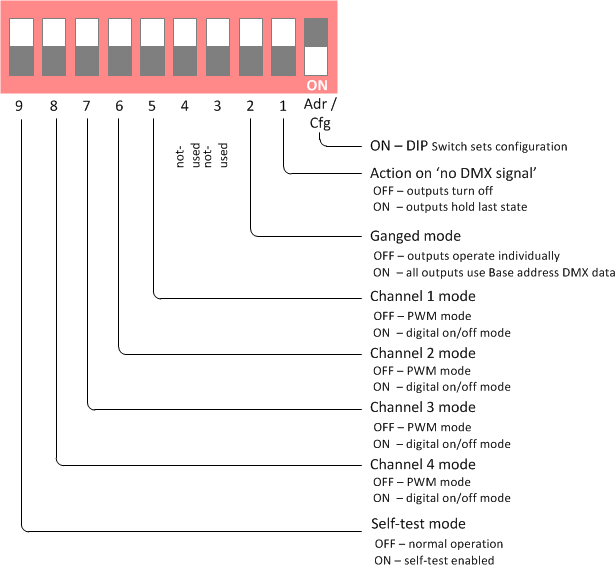
The binary bit positions in the channel data bytes correspond to the DIP switch position number shown in the diagram below. To configure the board with DMX in-band data set the bit positions to '1' or '0' in the channel data as you would the DIP switch to ON or OFF.
A ‘0’ in the bit positions corresponds to the DIP switch number being set to OFF
A ‘1’ in the bit positions corresponds to the DIP switch number being set to ONAny unused bits should be set to '0'
DMX Base Address
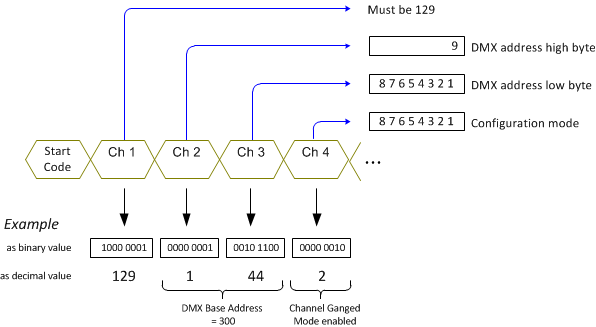
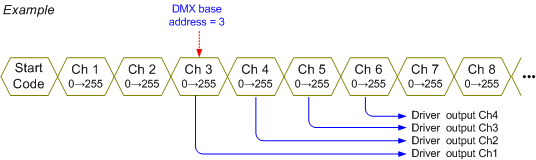
The driver board receives data over four consecutive channels starting at the base address configured on the board. The base address can be set to start at any address in the DMX packet, however it also needs to be set to an address compatible with the DMX controller. Some controllers expect the start address to be located at fixed offsets, eg. 1, 7, 13, 19, 25... Refer to your controllers documentation.
Setting the DMX Base Address using the DIP switch
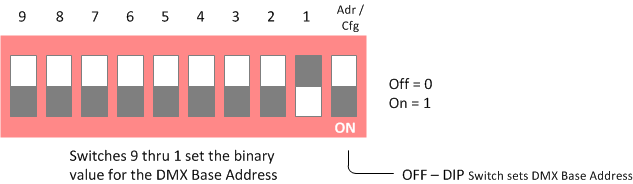
Adr/Cfg switch should be set to OFF.
The firmware then uses the rest of the DIP switch to set the DMX base address.Switches 9 to 1 are used to set the binary value of the DMX Base Address used by the board.
Switches set to the OFF position correspond to a binary value of 0
Switches set to the ON position correspond to a binary value of 1The DIP switch is only read when the board is powered-on. The address setting read from the switch is automatically saved to the microcontroller EEPROM. When no DIP switch is present, or the switch is set to Configuration Modes, the value previously saved to the EEPROM will be used.
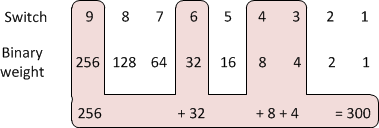
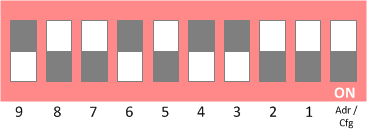
Example: To set the base address to 300, set switches 9,6,4 & 3 to the on position.
256 + 32 + 8 + 4 = 300
Google will convert decimal to binary (see example below).
Ignore the leading 0b and set the switches so 1 = switch ON and 0 = switch OFF


Setting the Configuration using the DIP switch
Adr/Cfg switch should be set to ON. The firmware then uses the rest of the DIP switch to set the mode configuration for the driver board.
Action on no DMX signal received. When no DMX signal is received the controller can either turn all outputs off, or continue to drive the outputs with the last PWM or digital output value for the channel before the DMX data signal was lost.
Ganged Mode. In ganged mode all four outputs use the data from the Base DMX Address.
The table below shows the address used for the channel data depending on whether the DIP switch is ON or OFF
Channel-1 Channel-2 Channel-3 Channel-4 Base Address ON/OFF ON ON ON
Base Address+1 OFF Base Address+2 OFF Base Address+3 OFF Channel Mode. Each output can operate in either PWM or digital mode. The operating mode can be set for each channel individually.
In PWM mode the output is driven with a PWM signal, the duty cycle is set by the DMX data value:
0 = 0% thru 255 = 100%In digital mode the output is either on or off.
When the DMX data value is 0 the output turns off.
When the DMX data value is 255 the output turns on.
DMX data between 1 and 254 is ignored and will not change the output.
Self-Test. When self-test mode is enabled each output turns on at 0.5 second intervals until all outputs are on (100% PWM duty). Each output then turns off at 0.5 second intervals until all outputs are off (0% PWM duty). This repeats continuously until the self-test DIP switch is set to the OFF position and power is cycled to the board. During self-test, any data received on the DMX channel is ignored.
Operation
DMX Channel data
PWM mode
Channel Value Function 1 0 - 255 PWM 0% - 100% 2 0 - 255 PWM 0% - 100% 3 0 - 255 PWM 0% - 100% 4 0 - 255 PWM 0% - 100% Digital mode
Channel Value Function 1 0
1-254
255Off
no-change
On2 0
1-254
255Off
no-change
On3 0
1-254
255Off
no-change
On4 0
1-254
255Off
no-change
On
Connectors / Headers / Jumpers
Board power (+VB / GND)
Input power for the driver board. 9-18 volts regulated DC @ 25mA
Channel power (+VF / GND)
The MOSFET channel power is applied to the +VF / GND connector terminals.
Voltage range is 3 to 36 volts DC
Maximum current per channel is 3 amps giving maximum input power of 12 amps.The current rating of the power supply will depend on the devices being driven. Ensure you use a suitable power supply for your application.
Note:
If the MOSFET channel power supply is within the range 9 to 18 volts, fitting the LK1 link wire on the PCB will allow the board to use the +VF power supply input eliminating the need for two power sources or extra wiring at the connector terminal.
CH1,CH2,CH3,CH4
Low side switched outputs connected to the onboard MOSFETS. Channel 1 is controlled by data sent to the DMX base address of the board, channels 2,3 and 4 to the next 3 consecutive addresses.
In Ganged mode all four channel outputs use data in the DMX Base Address data frame
Do not exceed 3 amps per channel absolute maximum.There is no fault protection on the outputs so depending on your application you may want to use suitably rated in-line fuses.
DMXin
Connects to the DMX data cable. Since there are various DMX connector standards you'll need to wire this to the particular connector you are using e.g. XLR-3pin, XLR-5pin, RJ45 jack.
TERMWhen the jumper is closed, the DMX signal is terminated into a 120 ohm resistor on the board. This should only be done on the last board. Also, if an external cable terminator is used, don't terminate on the board.
JP1
Open, normal operation
Closed, enable DMX configuration mode (see text)CN1
This 5 pin connector brings the four channel driver output pins from the microcontroller to
the edge of the board along with a GND connection. This makes it easy to interface the driver board to an alternative output device such as a relay module.
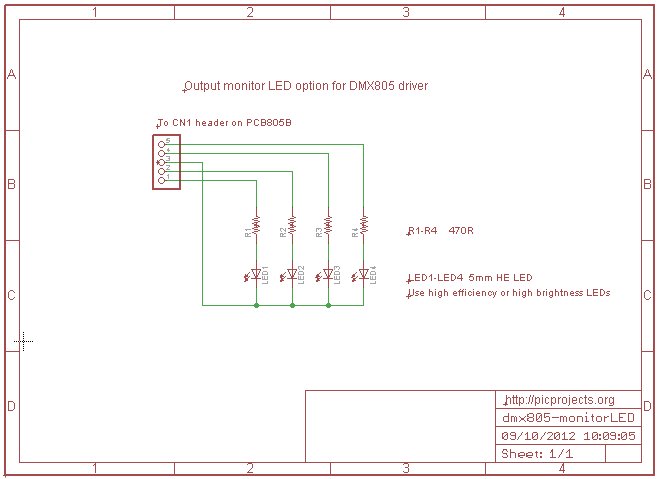
CN1 can also be used to connect four output monitor LEDs to the driver board. The schematic (left) shows how this can be done if it is required. Use high efficiency or high brightness LEDs with current limit resistors no lower in value than 470R to ensure the MOSFET gate drive voltage is not adversely affected.
ICSP header
This provides a connection for In-circuit serial programming of the PIC.
Status LED
The status LED provides indication that DMX data is being received during normal operation and error and status codes if a problem is detected during start-up.
Note: Since the status LED shares the same PIC control line as a signal on the ICSP header when the the board is connected to a PIC programmer the status LED should be ignored until the programmer is disconnected.
Normal operation
LED Explanation On
- DMX data received within the last 1.5 seconds
- At power-on for ~4 seconds (even if no data received)
Blinking 0.5Hz
- No DMX data has been received within the last 1.5 seconds
- DMX D+/D- signal connection reversed.
Startup Status Codes
If an error is detected at power-on the status LED indicates the detected error condition or status by blinking a number of times followed by a pause; this repeats continuously. The cause must be corrected and the driver restarted to clear the condition and enter normal operation.
LED blinks Cause 2 Completed a DMX in-band configuration. 3 Invalid DMX base address. =0 4 Invalid DMX base address. >509 5 EEPROM write failed after 5 retries 6 PIC internal GPR memory failed to initialise
- Status code 2 is not an error. Once the DMX configuration has completed, remove the mode jumper and cycle power to the board to use the new settings.
- Status codes 3 and 4 indicate the DMX base address for the board is invalid. Re-program a valid address, using either the DMX address board, DMX in-band configuration
- Status codes 5 and 6. If these can't be cleared by cycling power to the board, then the PIC is faulty and should be replaced.







Firmware
DMX805 PWM LED Driver Firmware
PIC16F1823 microcontrollers pre-programmed with the DMX805 firmware are available to buy from the Picprojects on-line eShop. Part #PRG805The firmware for this project is not available to download.
DMX Compatibility
We've tested the DMX driver board with the following DMX controllers:
- Velleman USB controller DMX interface (K8062) with the bundled software.
- Skytronic 54 channel DMX controller
DMX512 test data transmitter.
This small application generates 8 frames of DMX data in channels 1 to 8. The data in channels 1 to 4 increments from 0 to 255 in a repeating pattern. Data in channels 5 to 8 is always zero.
This code was written to allow testing of the DMX Driver with a DMX data stream where the Break, MAB, packet idle time, packet length, etc could all be configured. This was required since many commercial products don't generate DMX packets with minimum timing parameters and it was necessary to ensure the application code would work reliably under these conditions.
This code has been provided to allow testing of the DMX Driver described on this web page with a consistent DMX512 data packet stream. The DMX output from this code generates a Break of 94uS, MAB of 5.8uS and an idle time between packets of 5uS. Channel data is sent back-to-back with no delay.
Description Filename Download link DMX transmitter test code
HEX file ready to program into a PIC16F688dmx688demotx.HEX
V1.0.0 15/10/2012download
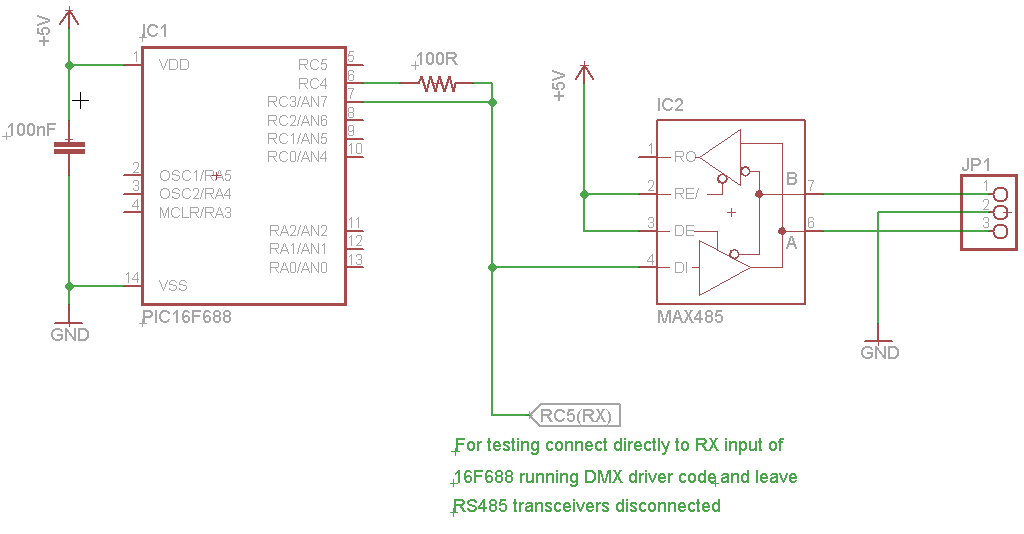
checksum 7347Example schematic for testing
برچسبها: حسین ملکی, پیام نور شیراز, مهندسی برق پیام نور شیراز, مهندسی پیام نور شیراز
دسته بندی : علمی

- اخبار/فعالیت های انجمن علمی برق
- علمی
- اخبار تکنولوژی
- کار عملی
- قطعات الکترونیکی
- دانلود
- ابزار آلات مهندسی برق
- نمونه سوال/ پیام نور/آزاد/غیر انتفاعی/دولتی/
- نرم افزار های مهندسی برق
- فرهنگی/حدیث/طنز/حجاب
- PLC
- آموزش گام به گام میکروکنترلر
- جمع آوری پروژه های میکروکنترلری
- مدارهای کاربردی آنالوگ
- کتب و جزوات مهندسی برق
- مجلات تخصصی و مقالات
- آموزش پروتئوس
- معرفی شرکت های صنعت برق و الکترونیک
- منابع تغذیه ،شارژرها و باطری ها
- نمونه برنامه ها میکرو به زبان c و درایور ها
- آموزش برنامه نویسی
- میکرو و معرفی پروگرامر های خوب/PIC/AVR/ARM/DSPIC/
- معرفی برد های آموزشی داخلی و خارجی
- فعالیت باحال برقی

بسیجی گمنام خمینی ٍ "" و لا یحمل هذا العلم الا اهل البصر و صبر و العلم به مواضع حق ""
و این پرچم مبارزه را جز افراد با بصیرت و صبور و آگاه به جایگاه حق به دوش نمی کشند .
این وبلاگ متعلق به گروهی از سربازان حقیقی حضرت بقیه الله الاعظم می باشد که در عرصه جهاد علمی و فرهنگی فعالیت می کند .
ایمیل : malekipcb@gmail.com

تمامی حقوق متن ها، تصاویر مربوط به این سایت می باشد و استفاده از آن ها با لینک دادن به سایت مجاز می باشد.
